IPTV Live Video Encoding & Streaming with Intel iGPU and Arc GPU
 Intel QSV (Quick Sync Video) is a hardware-accelerated video encoding and decoding
technology integrated into Intel HD graphics cards. It enables fast, efficient video
transcoding by offloading video processing tasks from the CPU to a dedicated on-chip video
engine, significantly reducing power consumption and processing time.
Intel QSV (Quick Sync Video) is a hardware-accelerated video encoding and decoding
technology integrated into Intel HD graphics cards. It enables fast, efficient video
transcoding by offloading video processing tasks from the CPU to a dedicated on-chip video
engine, significantly reducing power consumption and processing time.
Intel Quick Sync is available on most Intel Core processors starting from the early 2nd generation (Sandy Bridge), and some Celeron and Xeon processors starting from the 4th generation (Haswell).
Visit Intel Product Specifications to find out if your processor is capable of Quick Sync Video.
 Intel Arc is Intel discrete GPU product, designed for gaming, content creation, and
compute workloads. Unlike Intel's integrated graphics, Arc GPUs are standalone graphics
cards that feature their own high-performance GPU cores, memory, and dedicated media
engines, supporting hardware acceleration for video encoding/decoding like H.264,
H.265/HEVC, VP9 and AV1.
Intel Arc is Intel discrete GPU product, designed for gaming, content creation, and
compute workloads. Unlike Intel's integrated graphics, Arc GPUs are standalone graphics
cards that feature their own high-performance GPU cores, memory, and dedicated media
engines, supporting hardware acceleration for video encoding/decoding like H.264,
H.265/HEVC, VP9 and AV1.
Set up Intel Quick Sync Video on Windows
To set up Intel Quick Sync Video on Windows, desktop operating systems like Windows 10 are recommended over server OS. Make sure to install the latest Intel Graphics driver, as outdated drivers could cause unexpected encoding problems.
Set up Intel Quick Sync Video on Linux
Setting up Intel QSV on Linux is significantly more complex, and we strongly recommend
avoiding this unless necessary. If you are using recent Linux distributions like Ubuntu
22.04, you may find driver packages available in the release repositories that can be
installed via apt-get. On older distributions, you may need to download and
build drivers from source manually. For detailed instructions, visit
Intel Client GPU Installation.
After installation, run vainfo in a command console to verify that the Intel
driver is working correctly. If not, try setting environment variables
LIBVA_DRIVER_NAME (such as iHD or i965). Also set
LIBVA_DRIVERS_PATH if driver files cannot be found.
Set up Intel Quick Sync Video Encoding
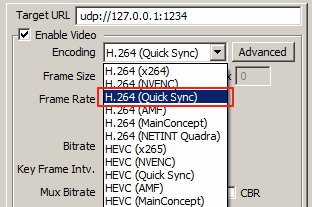
IPVTL supports H.264, HEVC, MPEG-2, VP9 and AV1 encoding with Intel Quick Sync. In channel config, choose encodings with Quick Sync to enable it.
Note different Intel processors have different capabilities of video encodings. For example 9th/10th generation Intel Core processors (Intel UHD Graphics 630) supports HEVC/H.265 main profile only, while 11th (Intel UHD Graphics 750) and above generations support HEVC main and scc (screen content coding) profile. For details please visit Media Capabilities Supported by Intel Hardware.
Set up Intel Quick Sync Video Decoding
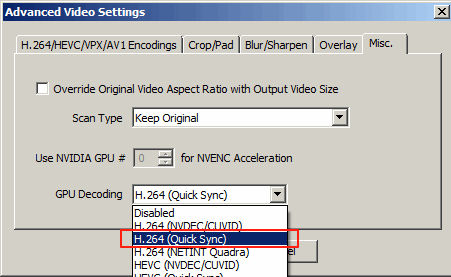
If the channel source video is encoded in H.264 or HEVC, you can enable Intel Quick Sync decoding to perform full GPU transcoding. Select H.264 or HEVC with Quick Sync (matching your source video format) in advanced video options > Misc. > GPU Decoding. This performs all video decoding, resizing, and encoding operations (including deinterlacing if required) on the GPU, avoiding unnecessary data transfers between system memory and video memory.